
UKG Authentication
UKG Authentication offers a modern authentication experience that is designed to be more secure and user-friendly for UKG Talk.
Authenticating with UKG Authentication
UKG Authentication offers a modern authentication experience that is designed to be more secure and user-friendly for UKG Pro WFM and Talk.
Determining When a Tenant is Configured for UKG Authentication
This section describes the two methods that can be used to determine if a tenant has been configured to use UKG Authentication:
- Within the UKG Pro WFM User Interface:
- Select the main menu and navigate to: Administration > Application Setup > Common Setup > Client Management
- Only tenants configured for UKG Authentication can see the Client Management page used to create and manage Client IDs, Client Secrets, and other credentials. If a tenant is configured for any other authentication type, this page will not be displayed.
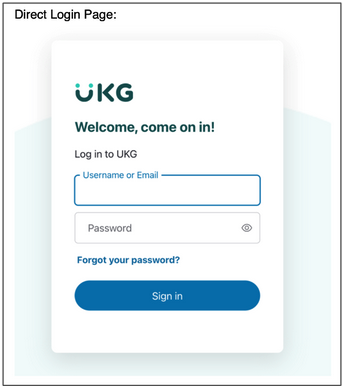
- The UKG Authentication Login screen is unique. UKG Authentication users use the following screen to enter their credentials:
UKG Authentication Application Flows (Methods)
Pro WFM supports authenticating using UKG Authentication. There are three application flows (methods) that can be leveraged to obtain an access token using UKG Authentication:
Interactive Application Flows
- Authentication Using Authorization Code: This is the preferred method for new clients and the most secure method of authentication. The Authorization Code Grant flow requires the provision of the client ID, client secret, Redirect URL, and Logout Redirect URL.
- Authentication Using ROPC: This is the default method for current clients. The Resource Owner Password Credentials (ROPC) grant flow requires the provision of the client ID, client secret, and WFM-specific user credentials. This method should be used when actions need to be performed on behalf of a specific user, such as an employee or manager, for tasks like submitting time records or approving leave requests.
Non-Interactive Application Flow
- Authentication Using Client Credentials: This grant flow is tailored for system-to-system communications where impersonation of a named Pro WFM user is not necessary. It is appropriate for use cases such as executing scheduled integrations. Each client will be associated with a FAP that defines the level of access the client ID is allowed. Access tokens are fetched based on the client ID and client secret.
Selecting an Application Flow
Use the UKG Pro WFM user interface to select the desired application flow:
- From the main menu, navigate to: Administration > Application Setup > Common Setup > Client Management
Important Considerations
- Client Secret Security: When creating client credentials, it is your responsibility to store the newly created client secret in a secure location. Once a client has been created, the client secret cannot be recovered if it has not been copied and saved to another location.
- One Set of Credentials per Application: It is recommended to use one set of client credentials for each application.
- Tenant Specific Credentials: Client Credentials are tenant specific, therefore credentials created on a non-production cannot be used to get a token for a production tenant.
- Tenant Refresh: Upon Tenant Refresh, if the Client ID and Client Secret were updated during a previous refresh action, they are not updated again. Clients being copied over during the Tenant Refresh will need to have their Client IDs and Client Secrets regenerated.
- User-Specific Context: User-specific audits or user-specific context is not supported for Client Credential If user-specific context is required for your third-party API access, use the Non-Interactive Application Flow.
Once configured, client credentials can be exchanged for an access token that grants access to building third-party integrations using UKG Pro Workforce Management public APIs.
For information on configuring and managing client credentials using the Client Management page, see the online help.
Token Management
This section describes recommended authentication patterns for use with UKG APIs. Following these practices helps prevent authentication throttling, account lockouts, and service disruption—especially in batch jobs, load tests, and multi‑pod architectures. UKG authentication services enforce built‑in protections to safeguard user accounts. When interactive user credentials are used in automated or high‑frequency scenarios, these protections can be triggered unintentionally, resulting in 429 responses and eventual account lockout.
Recommended Approach (Required for System‑to‑System Access):
- For all system‑to‑system integrations, use OAuth 2.0 client‑credentials authentication designed specifically for automated workloads.
- Create separate client credentials per integration (and per data center if applicable).
- If you suspect the credentials have been compromised, update your credentials immediately.
- Monitor usage per client to isolate issues quickly.
- Only use ROPC if you need to access specific endpoints that are not available using the client credentials method.
Token Management Best Practices
Centralize your token management using distributed architectures (multiple pods, workers, or services):
- Use a centralized token service or shared cache.
- Reuse valid access tokens across instances.
- Avoid parallel token generation for the same integration to prevent multiple concurrent login flows that can overwhelm UKG authentication services.
- If you are using the ROPC, Refresh Token flow: when making an initial request, exchange the refresh token for a new access token and refresh token.
- Access tokens expire after 30 minutes and refresh tokens expire after 8 hours. These time limits are subject to change without notice.
- Do not hard-code access-token or refresh-token lifetimes. Use the token response metadata, including
expires_in, and refresh or renew tokens based on the token endpoint response. - If token renewal fails or you receive authorization errors such as
401or403, do not assume that the token has expired solely because of the status code. These responses can also indicate other authentication, authorization, or configuration issues. When using the ROPC refresh-token flow, request a new access token and refresh token when the token endpoint indicates renewal is required; if renewal is no longer possible, restart the authentication process.
Important: Do not rely on fixed time-based implementations for access tokens or refresh tokens. Token lifetimes can change without notice, and interruptions or other conditions can cause tokens to become unusable earlier than expected.
Handling Throttling Correctly
Even with client credentials, integrations must handle throttling gracefully.
- Expect HTTP 429 (Too Many Requests) responses during bursts
- Honor Retry-After headers
- Implement exponential backoff
- Do not retry immediately or aggressively
- If you are using ROPC, refresh token management is still required.
- Proper 429 handling is required for all integrations.
Patterns to Avoid (if possible)
- Using named user credentials (ROPC) for automated flows.
- Using interactive user accounts (ROPC or password grant) for automated integrations can lead to:
- Authentication throttling
- Brute‑force protection triggers
- Global account lockouts affecting all dependent jobs
- If ROPC must be used, ensure you are following token best practices.
- This pattern is not supported for high‑volume or batch integrations.
- IP Allowlisting or Disabling Protections
- Requests to whitelist IP ranges or relax authentication protections are not supported due to security and cross‑tenant risk. These controls are intentionally non‑configurable.
Summary Checklist
Before going live, confirm that your integration:
- Uses OAuth 2.0 client‑credentials for machine-to-machine integrations.
- Centralizes and reuses access tokens and refresh tokens.
- Avoids time-based implementations.
- Handles 429 responses with backoff.
- Avoids named user credentials for automation.
- Separates credentials per integration.
If you’re unsure which authentication model applies to your use case, review the UKG API authentication documentation or contact your UKG representative before implementing or load testing.
Using the Authorization Code Application Flow
Retrieve a Code:
To obtain an access token for the Authorization Code Grant flow, you must first retrieve a code. To obtain a code, you GET a call from the authentication URL:
NOTE: Establishing trust between the UKG authentication system and your IDP is beyond the scope of this document.
Include the following properties in the raw JSON request body:
- response_type: Indicates to Auth0 which OAuth 2.0 flow you want to perform. Use code for Authorization Code Grant Flow.
- client_id: The Client ID secret configured for an interactive authentication flow.
- audience: A fixed value. This must always be "https://wfm.ukg.net/api".
- scope: A list of scopes in space-delimited case sensitive strings.
- (Optional) organization: organization ID, if authenticating in the context of an organization.
- state: An opaque value the application adds to the initial request that Auth0 includes when redirecting the back to the application. This value must be used by the application to prevent CSRF attacks.
- redirect_uri: The URL to which Auth0 will redirect the browser after authorization has been granted by the user. This has to be an exact match to the list of redirect URI provided during configuration.
- realm: The realm specific to your tenant.
Sample JSON
 {
   "response_type": "code",
   "client_id": "YOUR_CLIENT_ID",
   "audience": "https://wfm.ukg.net/api",
   "scope": "YOUR_SCOPES",
   "organization": "OPTIONAL_ORG_ID",
   "state": "YOUR_STATE",
   "redirect_uri": "YOUR_REDIRECT_URI",
   "realm": "TENANT_REALM"
 }
A successful call returns:
- code: A code which can be exchanged for an access_token.
- state: An opaque value the application adds to the initial request that Auth0 includes when redirecting the back to the application. This value must be used by the application to prevent CSRF attacks.
Sample JSON
     {
       "code": "CODE",
       "state": "STATE"
     }
Retrieve an Access Token Using the Code:
To obtain an access token, you POST a call to the authentication URL: https://welcome-us.ukg.net/oauth/token
Include the following list of properties in the raw JSON request body:
- client_id: The client_id is the identifier for your app. You will have received a client_id when first registering your app with the service.
- client_secret: Your applications Client Secret.
- code: The code retrieved in the previous step.
- grant_type: Denotes the flow you are using. For Authorization Grant Code flow, use authorization_code.
- redirect_uri: The redirect_uri may be optional depending on the API, but is highly recommended. This is the URL to which you want the user to be redirected after the authorization is complete. This must match the redirect URL that you have previously registered with the service.
Sample JSON
  {
    "client_id": "YOUR_CLIENT_ID",
    "client_secret": "YOUR_CLIENT_SECRET",
    "code": "CODE",
    "grant_type": "authorization_code",
    "redirect_uri": "YOUR_REDIRECT_URI"
     }
A successful call returns:
access_token: A string representing the access token.
scope: The server uses this response parameter to inform the client of the scope of the issued access_token.
expires_in: Lifetime in seconds of the access_token. The access token is usable from the moment it is generated until the number of seconds defined by expires_in elapses.
token_type: Defines the type of token profile issued by the server, such as Bearer or mac. This enables the client to successfully utilize the access token.
refresh_token: Describes the nature of the token. Normally, “bearer.”
id_token: Describes the nature of the token. Normally, “bearer.”
WARNING: Even though your tokens are time-limited, they are very powerful. Do not share your access_token Protect them as you would a username and password combination.
Sample JSON
  {
    "access_token": "ACCESS_TOKEN",
    "scope": "YOUR_SCOPES",
    "expires_in": 3600,
    "token_type": "Bearer",
    "refresh_token": "REFRESH_TOKEN",
    "id_token": "ID_TOKEN"
 }
Using the ROPC Application Flow
To obtain an access token with a specific user context, you POST a call to the authentication URL: https://welcome-us.ukg.net/oauth/token
Include the following list of properties in the raw JSON request body:
- client_id: The Client ID secret configured for an interactive authentication flow.
- client_secret: The Client secret configured for an interactive authentication flow.
- username: The username of a Pro WMF user.
- password: The password of a Pro WFM user.
- grant_type: A fixed value. This must always be "http://auth0.com/oauth/grant-type/password-realm" for ROPC calls.
- realm: The realm specific to your tenant.
- audience: A fixed value. This must always be "https://wfm.ukg.net/api".
Also include the following HTTP header:
- Content-Type: application/json
cURL Example
curl --location 'https://
--header 'Content-Type: application/json' \
--data-raw '{"client_id": " CLIENT ID ",
"client_secret": " CLIENT SECRET ",
"username": " PRO WFM USERNAME ",
"password": " PRO WFM PASSWORD ",
"grant_type": "http://auth0.com/oauth/grant-type/password-realm",
"realm": " REAL FOR YOUR SERVER ",
"audience": "https://wfm.ukg.net/api"}'
Example Response
{"access_token": " ACCESS TOKEN STRING ",
"scope": "openid offline_access read:userinfo access:wfm",
"expires_in": 1800,
"token_type": "Bearer"}
A successful call returns:
- access_token: A string representing the access token.
- scope: The server uses this response parameter to inform the client of the scope of the issued access_token.
- expires_in: Lifetime in seconds of the access_token. The access token is usable from the moment it is generated until the number of seconds defined by expires_in elapses.
- token_type: Defines the type of token profile issued by the server, such as Bearer or mac. This enables the client to successfully utilize the access token.
WARNING: Even though your tokens are time-limited, they are very powerful. Do not share your access_token Protect them as you would a username and password combination.
Sample JSON
  {
   "access_token": "ACCESS_TOKEN",
   "scope": "openid offline_access read:userinfo access:wfm",
   "expires_in": 1800,
   "token_type": "Bearer"
  }
Using the Client Credentials Application Flow
To obtain an access token for the client credential flow, you POST a call to the authentication URL: https://welcome-us.ukg.net/oauth/token
Include the following list of properties in the raw JSON request body:
client_id: The Client ID configured for an interactive authentication flow.
client_secret: The Client Secret configured for an interactive authentication flow.
audience: A fixed value, this must always be "https://wfm.ukg.net/api" for client credential flows.
grant_type: A fixed value. This must always be "client_credentials" for client credential flows.
organization: An organization property specific to your tenant.
Also include the following HTTP header:
Content-Type: application/json
cURL example
curl --location 'https://
--header 'Content-Type: application/json' \
--data '{"client_id": " CLIENT ID ",
"client_secret": " CLIENT SECRET ",
"audience": "https://wfm.ukg.net/api",
"grant_type": "client_credentials",
"organization": " ORGANIZATION "}'
Example Response
{"access_token": " ACCESS TOKEN STRING ",
"scope": "access:wfm",
"expires_in": 1800,
"token_type": "Bearer"}
A successful call returns:
access_token: A string representing the access token.
scope: The server uses this response parameter to inform the client of the scope of the issued access_token.
expires_in: Lifetime in seconds of the access_token. The access token is usable from the moment it is generated until the number of seconds defined by expires_in elapses.
token_type: Defines the type of token profile issued by the server, such as Bearer or mac. This enables the client to successfully utilize the access token.
Sample JSON
  {
   "access_token": "ACCESS_TOKEN",
   "scope": "openid offline_access read:userinfo access:wfm",
   "expires_in": 1800,
   "token_type": "Bearer"
}WARNING: Even though your tokens are time-limited, they are very powerful. Do not share your access_token Protect them as you would a username and password combination.
Obtaining and Using a Refresh Token
Refresh tokens are used to request a new access token and/or ID token for a user without requiring them to re-authenticate. You may also use a refresh token to request a new ID token for a user, and should do so if you need to refresh the claims within the ID token.
Obtaining a Refresh Token
To get a refresh token, you must include the offline_access scope when you initiate an authentication request through the /authorize endpoint. Be sure to initiate Offline Access in your API.
For example, if you are using the Authorization Code Flow, the authentication request would look like the following:
https://{yourDomain}/authorize?
audience={API_AUDIENCE}&
scope=offline_access&
response_type=code&
client_id={yourClientId}&
redirect_uri={https://yourApp/callback}&
state={OPAQUE_VALUE}
Once the user authenticates successfully, the application will be redirected to the redirect_uri, with a code as part of the URL: "{https://yourApp/callback}?code=BPPLN3Z4qCTvSNOy". You can exchange this code with an access token using the /oauth/token endpoint.
curl --request POST \
--url 'https://{yourDomain}/oauth/token' \
--header 'content-type: application/x-www-form-urlencoded' \
--data grant_type=authorization_code \
--data 'client_id={yourClientId}' \
--data 'client_secret={yourClientSecret}' \
--data 'code={yourAuthorizationCode}' \
--data 'redirect_uri={https://yourApp/callback}'
The response should contain an access token and a refresh token:
{
"access_token": "eyJz93a...k4laUWw",
"refresh_token": "GEbRxBN...edjnXbL",
"token_type": "Bearer"
}
If you are requesting a Refresh Token for a mobile app using the corresponding Native Client (which is public), then you don't need to send the client_secret in the request since it's only required for confidential applications.
IMPORTANT: Refresh Tokens must be stored securely by an application since they allow a user to remain authenticated essentially forever.
Using a Refresh Token
To exchange the refresh token you received during authentication for a new access token, call the Auth0 Authentication API Get token endpoint in the Authentication API.
Basic authentication:
curl --request POST \
--url 'https://{yourDomain}/oauth/token' \
--header 'authorization: Basic {yourApplicationCredentials}' \
--header 'content-type: application/x-www-form-urlencoded' \
--data grant_type=refresh_token \
--data 'client_id={yourClientId}' \
--data 'refresh_token={yourRefreshToken}'
Post authentication:
curl --request POST \
--url 'https://{yourDomain}/oauth/token' \
--header 'content-type: application/x-www-form-urlencoded' \
--data grant_type=refresh_token \
--data 'client_id={yourClientId}' \
--data 'client_secret={yourClientSecret}' \
--data 'refresh_token={yourRefreshToken}'
Parameter definitions:
grant_type – Type of grant to execute.
client_id – Application's client ID.
client_secret - (Optional) Application’s client secret. Only required for confidential applications using the Post authentication method.
refresh_token – Refresh token exchange.
The response will include a new access token, its type, its lifetime (in seconds), and the granted scopes:
{
  "access_token": "eyJ...MoQ",
  "expires_in": 86400,
  "scope": "openid offline_access",
  "id_token": "eyJ...0NE",
  "token_type": "Bearer"
}
NOTE: If the scope of the initial token included openid, then a new ID token will be in the response as well.
Make an API Call
Once you have generated an access token, you can make API calls.
Updated 5 months ago